Click to WhatsApp ads guide: how it works and how AI helps you get the most out of it


Most direct-to-consumer brands faced the same problem over the years.
Increasing customer acquisition costs on social media platforms like Facebook and Instagram.
In 2025, the average cost per click (CPC) in Facebook ads for leads campaigns across all industries is $1.92, an increase from $1.88 last year, according to WordStream.
Apple's new privacy feature, App Tracking Transparency, has made it harder for advertisers to track user behavior and target users with personalized ads.
According to Adjust, in 2025, 30% of iPhone users in the US and 35% worldwide agreed to be tracked by Facebook, Snap, and other apps.
Advertising on Google is not immune to the impact of the changing online privacy ecosystem.
While Google has shifted its approach, confirming it will not deprecate third-party cookies in Chrome, the broader trend is undeniable. The industry is clearly shifting toward a future that relies less on third-party signals and more on first-party data.
But don't worry. This move is not the end of hyper-targeted ads. Better yet, it opens the door for innovation in advertising. In fact, Google urges brands to focus on building first-party relationships, which means gathering first-party data from your website visitors, including web sessions, page clicks, browser types, demographics, and traffic sources. Wonder how to start building one-to-one customer relationships?
Introducing click to WhatsApp ads on Facebook and Instagram
What are click to WhatsApp ads?
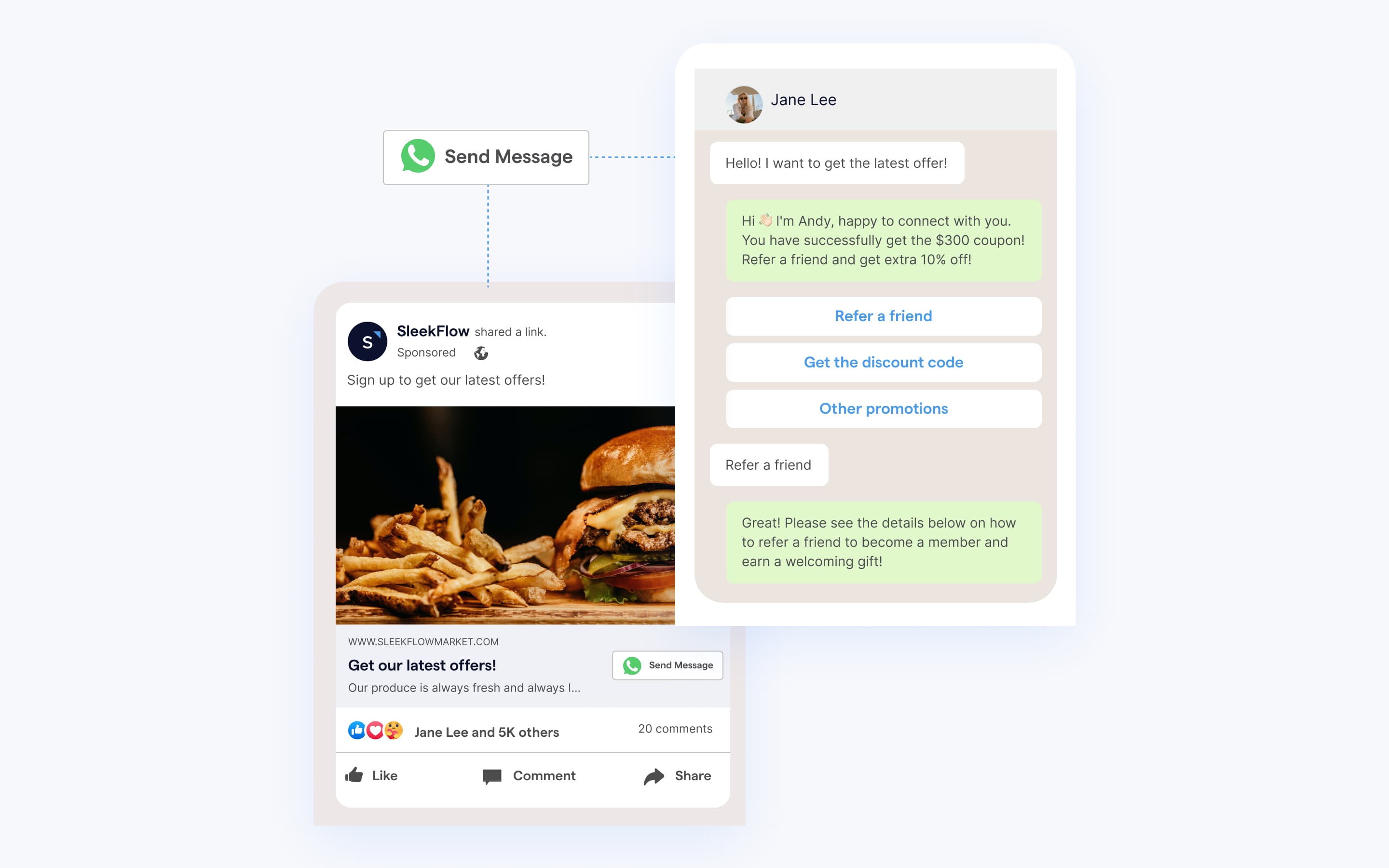
Click to WhatsApp ads (CTWA) are Facebook and Instagram ads with a Send Message CTA that opens a WhatsApp chat with a business. They appear across placements like feeds and stories, and are used to start conversations that can lead to leads or sales.

How do Facebook click to WhatsApp ads benefit businesses?
1. Collect first-party data and build robust visitor profiles
On WhatsApp, customers control the conversation and their privacy, making it an attractive option for people who want to talk directly to a business before buying. Naturally, they’re more likely to share personal details. When a potential customer clicks your ad, they're showing genuine interest. If you have a specialized AI Agent, it can then takes over the conversation right away. It asks the right qualifying questions, captures the answers as organized contact data, and syncs it all to your CRM in real time.
2. Drive discovery and sales through the chat
Click to WhatsApp ads work best when your product needs explaining before someone buys. For example:
When a customer needs a consultation before buying your products or services
When you need customer details to create custom orders
When you need customer preferences to coordinate an appointment
When you want to conduct surveys or lead generation campaigns via a chatbot
With AgentFlow by SleekFlow, you can manage the entire sales process in one chat. It recommends products from your live catalog, handles complex questions with context-aware reasoning, and creates personalized payment links. AgentFlow then guides customers all the way through checkout, all within a single conversation.
Checkmob used AgentFlow to reduce response times and book more qualified demos
Checkmob had a mature, highly integrated sales operation, but its lead qualification process was entirely manual.
The Inside Sales team spent excessive time on repetitive tasks like manual responses, scheduling, and demo confirmations. This created a bottleneck, increasing response times and negatively impacting conversion rates, all while making it difficult to scale engagement without losing a personalized touch.
Checkmob implemented SleekFlow's AgentFlow to automate their initial lead engagement on WhatsApp. AgentFlow now handles first contact, qualifies leads, and schedules demos automatically, syncing all data directly to their CRM. This allows the sales team to intervene only when human interaction is essential.
The implementation yielded swift and significant improvements:
70% reduction in response time
20% increase in qualified demo bookings
30% time savings for the sales team
3. Lower cost per conversation
Vessi, a Norwegian skincare brand that sells serums, face creams and eye treatments across nine European markets, found that email and SMS weren't reliable enough to confirm orders, recover failed deliveries or bring customers back for repeat purchases. The brand moved its customer communication to WhatsApp, using ads that click to WhatsApp alongside automated utility, marketing and service messages. In just over two months, Vessi saw a 41% increase in messages per lead and a 4% lift in conversion rate. Compared to its usual approach, conversations on WhatsApp cost 37% less.
How to use click to WhatsApp ads: examples of businesses
When using ads that click to WhatsApp, you need to identify the key stages of the buyer's purchasing journey where interactions matter the most and integrate WhatsApp into your campaign.
Take a look at the examples below. You can use the same strategy for your click to WhatsApp ads in different customer lifecycle stages.
Product discovery: Maggi Germany promotes virtual cooking classes on WhatsApp across Facebook and Instagram
Maggi, a famous culinary brand that has provided cooking products and services in Germany for over 130 years, created a digital assistant on its WhatsApp channel that allows customers to contact Maggi 24/7. Customers can take advantage of a free virtual cooking curriculum with step-by-step instructions, Q&A sessions and video guidance for specific cooking methods. The digital assistant could provide a grocery list for each dish and educate people about nutrition and safe food handling techniques via short quizzes.
Maggi announced the service through Instagram and Facebook ads that click to WhatsApp. It directed people who clicked on the ads to the cooking course on WhatsApp so that they could opt in and then select which class to join first. As a result, 200,000 messages were sent in two months, leading to a 3-point lift in campaign awareness.
Lead generation: Malaysian property developer matches sales agents and potential homebuyers on WhatsApp
EcoWorld is a Malaysian property developer specializing in residential townships in three of the country's central economic regions.

EcoWorld chose to use WhatsApp to diversify its lead source. EcoWorld used click to WhatsApp ads on Facebook and Instagram to encourage prospective homeowners to start a conversation with a sales agent about EcoWorld properties using WhatsApp. Besides targeting a broad audience of potential homebuyers, the ads are shown to people who have interacted with the company on Facebook, Instagram, or its website. This way, sales agents can personally connect with customers with a higher level of intent and support them throughout their journey.
The advertisements resulted in 15,000 total link clicks to open a WhatsApp chat. 21% of those leads were high-quality for follow-up. The return on ads spend can be as high as 6.5X based on the value of property bookings placed.
Conversion: Shopee merchant increases sales by retargeting previous e-shop visitors on WhatsApp
Indonesian tech accessory company Vyatta sells headphones, speakers, charging wires, and smartwatches and has eight retail stores across the country.
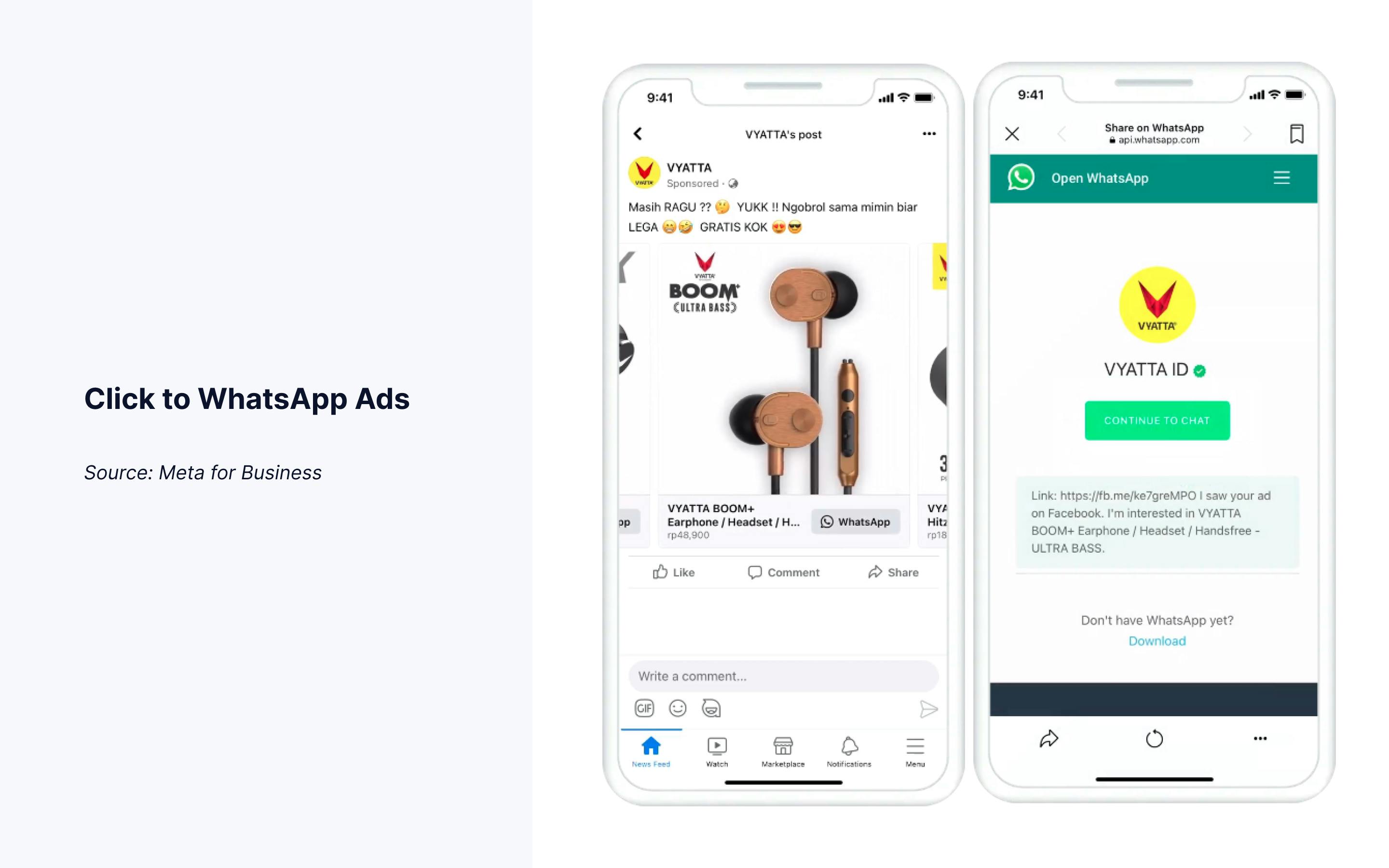
Vyatta ran Facebook collaborative ads that click to WhatsApp targeting Shopee store visitors who hadn't bought anything in the past 60 days. When people saw a product that piqued their interest on the company's catalog and clicked the CTA button, they automatically opened a WhatsApp chat window. The brand set up an automated welcome message to greet the prospects, and a Vyatta customer service agent was always standing by to help them learn more about the products. When the customer was ready to buy, the agent directed the customer to its Shopee store to complete their purchase.
Vyatta found that Facebook click to WhatsApp ads generated 5X more purchases and 79% lower cost per acquisition than the standard collaborative ads.

Integrate all messaging channels into one platform
Forget about the old-school way to chat. Team up with colleagues to boost productivity instantly.
Rules to follow before scaling click to WhatsApp ads
Before you pour more money into your click-to-WhatsApp (CTWA) campaigns, it's crucial to understand Meta's rules. Not knowing the policies, messaging guidelines, and cost structures can waste your budget and even get your account restricted. Let's make sure you have a solid foundation in these key areas before you scale.
Policy compliance
First things first: you need to play by Meta's advertising rules to avoid having your ads rejected or your account suspended. Here are the key policies to keep in mind:
Prohibited Content: Make sure you're not promoting restricted products like tobacco or certain financial services unless you have written permission from Meta.
Honest Ad Copy: Be straight with your audience. Your ad must accurately represent your product without making misleading claims.
Non-Discrimination: You cannot target or exclude audiences based on protected characteristics such as race, gender, or age.
Consistent User Experience: The conversation you start on WhatsApp needs to deliver on what your ad promised. A bait-and-switch will get you in trouble.
Verified Business Account: Get your WhatsApp Business Account verified. This step is essential for higher messaging limits and better overall performance.
Message template rules
When someone messages you from a click-to-WhatsApp ad, a 72-hour customer service window opens, allowing you to reply with free-form messages.
Once that window closes, you have to use a Meta-approved Message Template to re-engage them. Here’s what you need to know about these templates:
They must be approved by Meta before you can use them, a process that can take up to 48 hours.
Templates are sorted into three categories: Marketing, Utility, or Authentication, each with its own pricing.
Marketing templates come with per-conversation fees, and Meta limits how many you can send to one person in a 30-day period.
If you use personalization variables, make sure they are clearly defined and relevant to the message.
If Meta rejects a template, you must revise and resubmit it; simply renaming it won't work.
Pricing considerations
Costs can add up quickly, so it's importantvital to understand the WhatsApp Business API pricing model before you scale your ads.
WhatsApp bills you for each 24-hour conversation session, and the rates change based on a few factors:
Conversation Category: Marketing conversations are the most expensive, followed by Utility and Authentication ones.
Recipient's Country: The rates vary by market. For example, messaging a user in India costs less than messaging someone in the UK.
Who Starts the Conversation: Here’s a major advantage: conversations initiated by a user clicking your ad (CTWA) are free for the first 72 hours. This can lead to significant cost savings.
To prevent any surprise bills, take the time to project your total messaging costs. Map out your expected conversation volume against the rates in your target markets before you increase your ad spend.
What do you need to set up Facebook and Instagram click to WhatsApp ads?
1. Get a WhatsApp Business account
You cannot use a personal WhatsApp number to interact with your ads' audience. Before you create ads that click to WhatsApp in Ads Manager, get a WhatsApp Business account first. You can either download the WhatsApp Business App or sign up for WhatsApp Business API from a WhatsApp Business Solution Provider like SleekFlow.
Learn more about how to create a WhatsApp Business account.
Using the free WhatsApp Business App allows you to customize the profile with your company's name, address, business hours, social media profiles, website URL, product catalog, and logo. On the other hand, a WhatsApp Business account (WABA) with WhatsApp Business API provides more advanced features, including:
connecting with thousands of customers via agents or bots
integrating WhatsApp with CRM and e-commerce solutions
sending bulk WhatsApp messages
selling and getting paid on WhatsApp
Note: you would also need to create a Facebook Page for your business if you don't already have one. You won’t be able to find WhatsApp as an option in your personal Facebook profile. Make sure you have admin access to your page.
2. Connect your WABA phone number to your Facebook Page
Next, connect your WhatsApp account to your Facebook Page. If you are using the WhatsApp Business App, follow these steps:
Navigate to your Facebook Page, and click Settings.
In the left side column, click WhatsApp.
Choose your country code.
Enter your WhatsApp Business phone number, and click Continue.
Input the confirmation code that you receive, and click Confirm.
If you are using WhatsApp Business API, you need to request to connect your Facebook Page with the WABA phone number. Follow the instructions below:
Navigate to your Facebook Page, and click Settings.
In the left side column, click WhatsApp.
Choose your country code, enter your WhatsApp Business Platform phone number, and click Continue.
You can now check the request status. If you no longer want to connect, click Cancel request. Facebook will inform you whether your request is accepted or not. If the connection is approved, Facebook will link your Facebook Page and WABA. You can see the linked phone number in your Facebook Page's Settings.
The steps above will also auto-connect your WABA and Instagram account linked to your Facebook Page.
How to create ads that click to WhatsApp in Ads Manager
Moving on to setting up your Facebook click to WhatsApp ads in Ads Manager, here are five easy steps to follow.
Step 1: Define your ad's objectives and understand ad placements
These are different ad sizes and specifications. Some are particularly useful for meeting specific goals. Therefore, start with your end goal and then work backwards to develop your ad strategy.
For example, do you want to drive consumer interest? Dynamics ads available in Carousel, Collection or Photo format can automatically promote the most relevant items from your product catalog based on your website visitor's viewing behavior. Or, if you want to increase e-commerce sales, consider adding a Meta pixel to your website that lets you measure and optimize your ad campaigns based on the action people take on your site. Or, suppose you want to collect customer feedback in chat. Consider setting up WhatsApp automation (more on this below) before placing the click to WhatsApp ads, so you don't need to hire more agents to handle the sudden influx of conversations.
Step 2: Craft your ad copy and graphics
Keep your ad creatives simple and to the point. Write your ad copy with the people who are most likely to buy in mind. When they see your ads, they should be able to tell right away: what you're selling, what will be good for them and how to move forward.
If you're trying to reach a broad audience, use social proof in your ads to make people trust you. For example, you can show your customers' testimonials, reviews, and comments.

Prepare at least two sets of creatives so you can run split tests on the title, ad copy, and visuals. It helps you determine what kind of message gets people to buy the most.
Step 3: Create ads that click to WhatsApp in Ads Manager
Follow these steps to create ads that click to WhatsApp in Ads Manager:
Go to Ad creation.
Choose your objective.
Choose your campaign budget.
Under Conversion location, select messaging apps/ WhatsApp.
For engagement objectives, go to WhatsApp in the Accounts section, and select the relevant WhatsApp number from the drop-down menu. For traffic and sales objectives, choose the relevant Facebook Page. Facebook will use the WhatsApp number connected to your Facebook Page for this campaign.
Choose your audience, placements, budget, and schedule.
Select your ad format and complete your ad setup.
Click + Create to create your flow. Click Save and finish when you've finished.
Click Publish to publish your ad.
Step 4: Deflect inquiries with a self-service chatbot
Though you can place ads that click to WhatsApp using the free WhatsApp Business App, the app version does not allow you to create automated workflows. That's why many medium to large-sized businesses use WhatsApp Business API to handle conversations from Facebook click to WhatsApp ads at scale with automation.
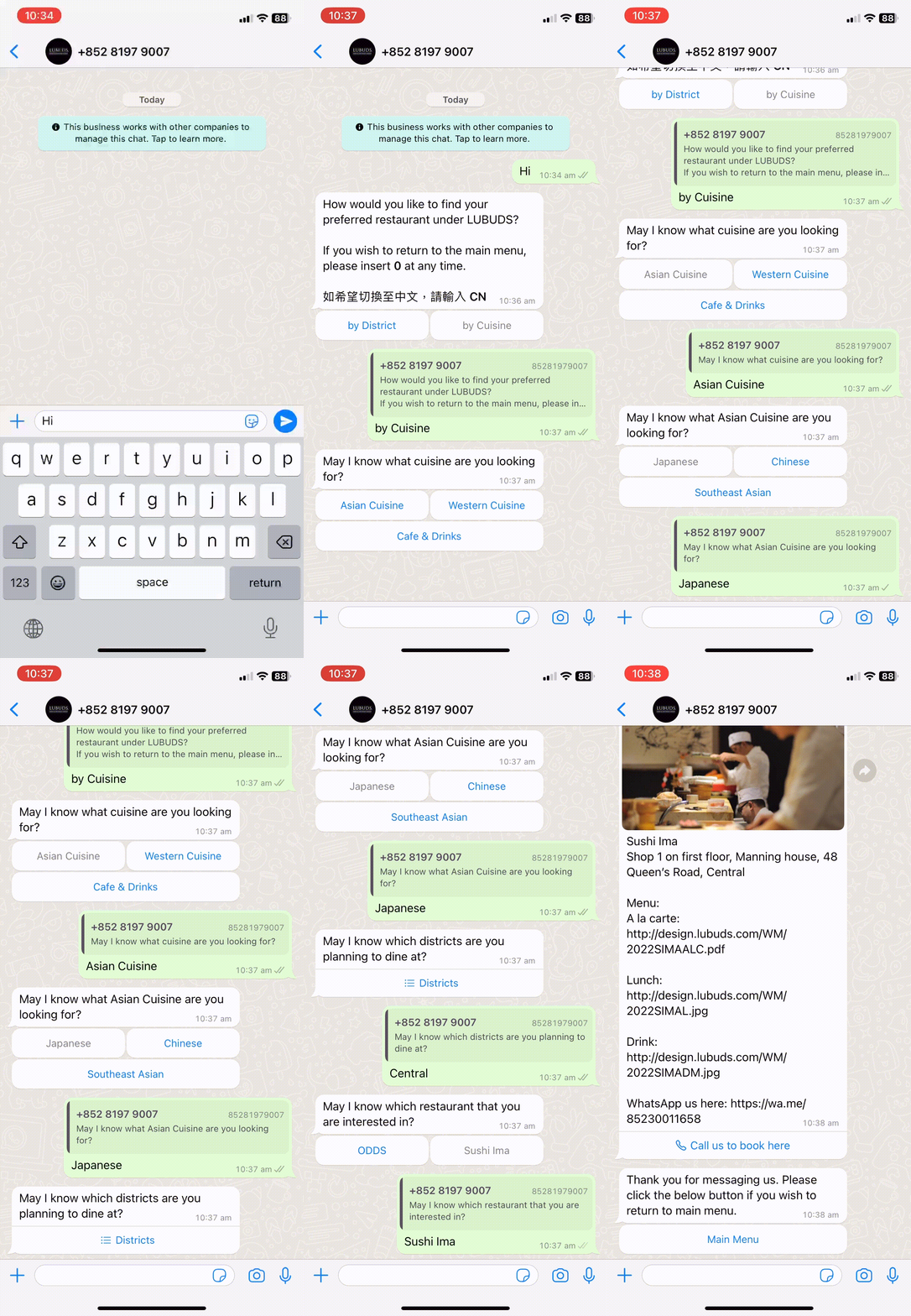
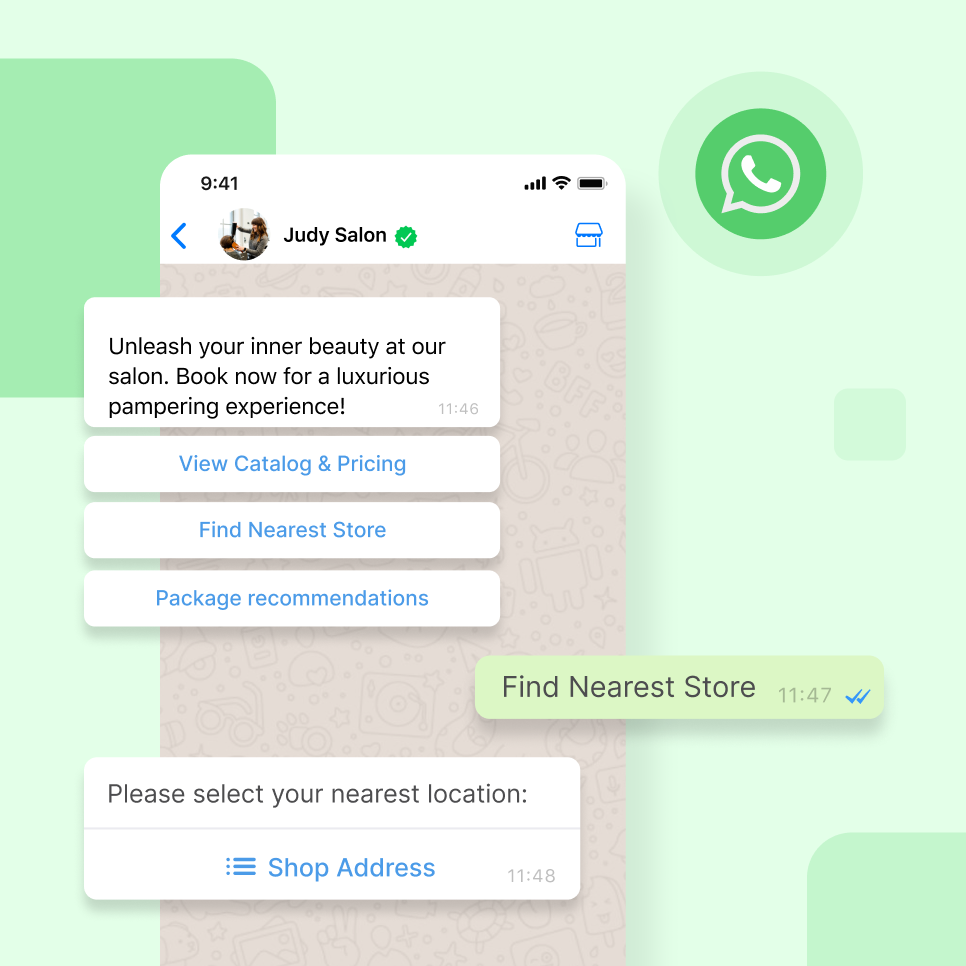
With WhatsApp automation, you can create a chatbot that automatically presents your new customers with various options and respond by taking them to your landing pages like this 👇🏻

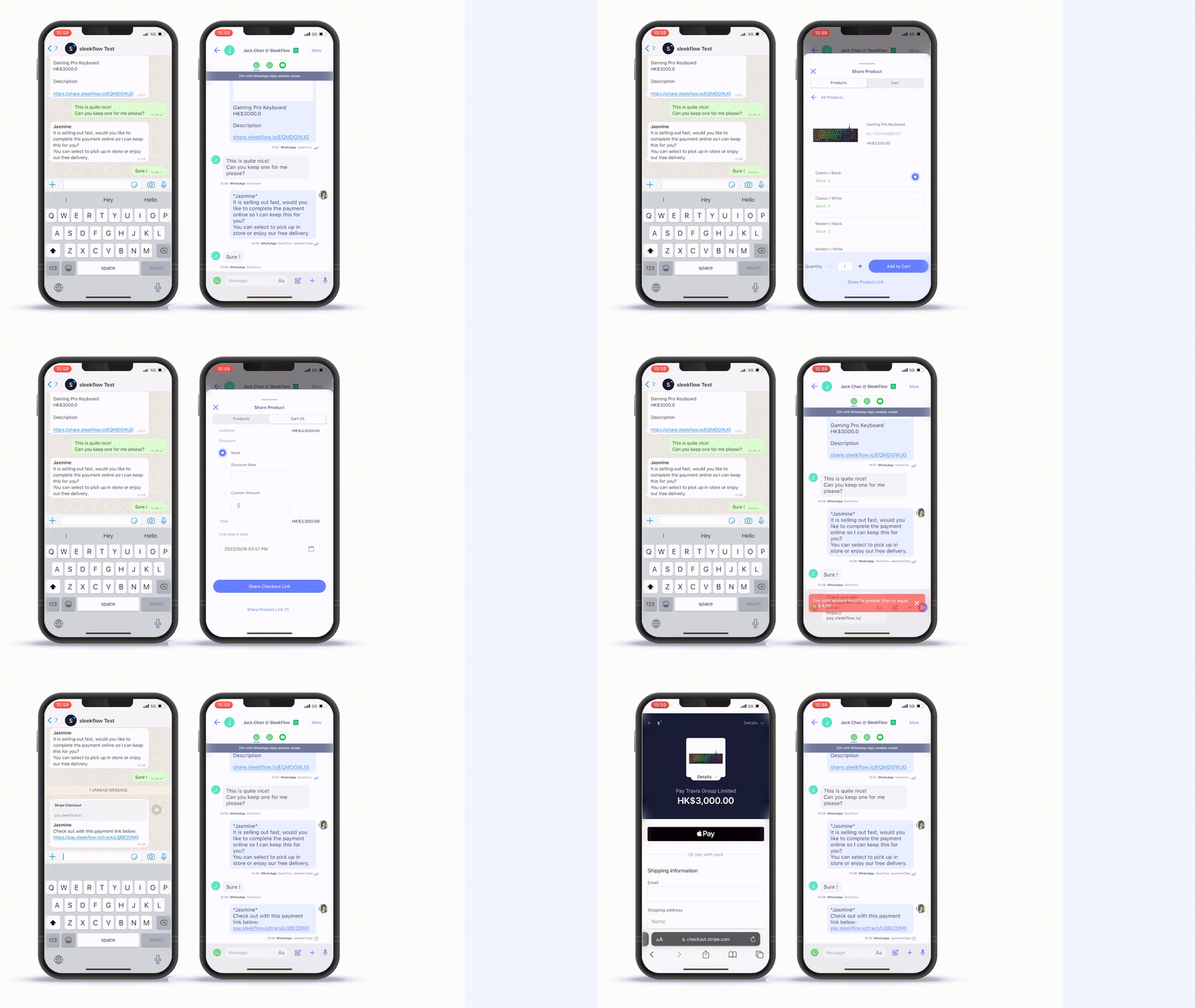
If you have a Shopify store, you can create a custom workflow that automatically routes conversations to customer service representatives by a queue. From there, they can help customers to add items to a cart and send a payment link for checkout in chat like this 👇🏻

Connect to WhatsApp Business API now!
Connect to WhatsApp Business API and unlock powerful tools to engage your audience.
Latest news and updates for click to WhatsApp ads
Previously, to create a click-to-WhatsApp ad, you would need to have a Facebook account linked to your WhatsApp Business Account. Now, you can create click-to-WhatsApp ads without the need for a Facebook account.
The best part of this upgrade is that sellers would be able to craft, purchase, and launch ads on Facebook directly from within the WhatsApp Business App itself. All you need is an email address!
With a single click, potential customers can initiate a conversation with your business on WhatsApp.
Here’s how you can create a click-to-WhatsApp ad with an email address:
Open the app and go to the "Advertise" section, then click "Get started".
Choose a photo from your phone's gallery, a catalog item, or a status to use for your ad. Keep in mind that catalog items need prior approval. You can select multiple photos and catalog items if needed.
Write a description for your advertisement, and then click "Next".
Set your daily budget, specify the duration of the ad, and define your target audience. Then, click "Next".
Review and agree to Facebook's non-discrimination policy, and then review your ad. Click "Next" when you're ready.
Enter your email address and request a six-digit code. You'll receive this code in your email.
Input the six-digit code you received.
Choose your country or region, currency, and time zone, and then click "Next".
Add a payment method and click "Next".
Enter your payment information and save it.
Provide your business information and save it.
Review your ad settings and payment method.
If everything looks good, click "Create ad". Once approved, your ad will appear under the "MANAGE" section.
Note: Creating a click-to-WhatsApp ad with an email address will not only show on Facebook, but it will also appear on Instagram.
For businesses targeting similar results on Google, Message Assets offer a similar communication path but it's still in beta stage.
Create CTWA in Ads Manager vs. in WhatsApp Business app
You can create a Click to WhatsApp ad in two ways. The best option for your business depends on your company size, technical skills, and campaign goals, as each method offers different levels of control, reach, and flexibility.
When to use Ads Manager: This is your go-to for campaigns with specific KPIs, multiple audiences, or retargeting needs. Ads Manager gives you a complete toolkit, letting you use advanced targeting, run split tests, integrate pixels, and optimize your budget. When you pair it with the WhatsApp Business API and a platform like SleekFlow, you can automate conversations, tag contacts, and assign agents. This makes your ad spend traceable, from the initial click all the way to the final sale.
When to use the WhatsApp Business App: Creating ads directly in the app is great for businesses new to paid WhatsApp acquisition. It's especially useful if you don't have a dedicated marketing team or a Facebook Business Manager account. The setup is simple, but it has limitations. You can only reach broad Facebook audiences, you can't retarget users, and you have to reply to every message manually. It's a solid starting point for small businesses, but you'll likely outgrow it.
If your team is struggling to keep up with all the incoming messages, it's a clear sign that you need to upgrade. Migrating to the WhatsApp Business API and connecting it with a platform like SleekFlow will become essential for scaling your operations.
How to reduce cost per result for click to WhatsApp ads
To lower your costs on click-to-WhatsApp ads, you need to focus on results that matter—like qualified leads or sales, not just conversations. Here are eight strategies you can use to make that happen:
Refine Your Audience: Instead of targeting broad demographics, focus on users who have already shown interest by visiting your website or engaging with your social media.
Leverage Video: Use video ads to tell your brand's story and capture attention in upper-funnel campaigns, which often leads to higher click-through rates.
Personalize Opening Messages: Customize the pre-filled WhatsApp message so it directly relates to the ad someone clicked. This provides instant context and makes the conversation feel more natural.
Automate First Responses: Use a chatbot, like SleekFlow's Flow Builder, to send instant replies. This simple step can improve lead qualification and boost conversion rates.
A/B Test Ad Copy: Try out different headlines and calls to action (CTAs). Experimenting will help you discover which messages resonate most with your audience.
Retarget Warm Audiences: Re-engage users who have already interacted with your brand. A time-sensitive offer can be a great way to bring them back into the conversation.
Align Ad Placement: Think about where your customer is in their journey. Match your ad placement, whether it's the Facebook News Feed or Instagram Stories, to that specific stage.
Monitor WhatsApp Quality Rating: Keep an eye on your WhatsApp Business Account's quality rating. If it drops, you may need to adjust your messaging strategy to avoid restrictions that drive up costs.
How to measure CTWA success
Many businesses make the mistake of measuring their Click-to-WhatsApp (CTWA) campaigns incorrectly. If you only look at the cost per click or chat, you might be misled, since many of those interactions won't turn into sales. To truly understand success, you need to track how your ads perform across three key stages of the sales funnel.
Stage 1: Cost per chat (CPC Chat)
Cost per chat measures how much you spend to start one conversation from your ad. You calculate it by dividing your total ad spend by the number of conversations started.
Cost per chat = Total ad spend ÷ Total conversations initiated
A low cost per chat seems good, but it doesn't reveal the full picture. You can easily lower this cost with high-volume, low-intent clicks that don't add much value. Think of it as a diagnostic tool to check your creative and targeting, not as your main success metric. By benchmarking CPC Chat across your campaigns and audiences, you can establish a reliable performance range and spot underperforming ads early.
Stage 2: Cost per qualified lead (CPQL)
A qualified lead is someone who shows enough interest to warrant a sales follow-up. The exact definition will vary depending on your business. To find your cost per qualified lead, you divide your total ad spend by the number of qualified conversations.
Cost per qualified lead = Total ad spend ÷ Total qualified conversations
To track this metric, you’ll need a way to label contacts as "Qualified" within your chat automation, which you can do with tools like SleekFlow's Flow Builder. This gives you a real-time view of how your campaigns are performing. Sales teams focus heavily on CPQL because it's a strong predictor of future revenue.
Stage 3: Cost per purchase (CPP)
This metric shows you how much ad spend it takes to generate one sale. The formula is straightforward:
Cost per purchase = Total ad spend ÷ Total purchases attributed to CTWA
Tracking CPP can be tricky. For e-commerce businesses with short sales cycles, you can often measure it within a few days. But for industries with longer cycles, like real estate or B2B, it could take weeks or even months.
Accurate attribution is key. To track CPP effectively, you should:
Use UTM parameters in the links you share on WhatsApp.
Tag contacts in SleekFlow with their original campaign source.
Compare completed orders in your CRM with the contacts you've tagged from that campaign.
By monitoring cost per chat, cost per qualified lead, and cost per purchase together, you get a complete picture of your sales funnel. This approach helps you pinpoint problems—for example, a high CPQL might signal issues with your qualification process, while a weak CPP could point to a breakdown in your sales follow-up.
{{__phrase_faq-title__}}
{{__phrase_share-article__}}